
Find Everything You
Need.


Let's Make Your Vision A
Reality
At *EngageMorePRO | ExposedAgent, we specialize in customizable promotional items designed to elevate your brand's visibility. With a wide range of products tailored for effective marketing campaigns, we empower businesses to make a lasting impression on their audience.
Our mission is simple: to provide innovative marketing solutions that meet and exceed our clients' needs. From branded apparel to tech gadgets, we offer a diverse selection of practical and memorable promotional items for every occasion.
Your Customizable Marketing Merchandiser
Elevate Your Brand and Leave a Lasting Impression with Personalized Promotional Solutions Tailored to Your Business Needs. Stand Out in the Market, Engage Your Audience, and Drive Results with Customizable Merchandise from BrandBoost.
Shop By Categories
Discover the perfect promotional items to elevate your brand and leave a lasting impression with our Shop by Category section. Whether you're looking for branded apparel, tech gadgets, office essentials, or eco-friendly products, we have everything you need to make a statement in your marketing campaigns.


What Client Our Says About Us

Company Name should look
for ones that are specific,
detailed, and highlight the
unique benefits of working with
the company.
Alex John Martin
Manager
Company Name should look
for ones that are specific,
detailed, and highlight the
unique benefits of working with
the company.
Alex John Martin
Manager
Company Name should look
for ones that are specific,
detailed, and highlight the
unique benefits of working with
the company.
Alex John Martin
Manager
Frequently Asked Question
Welcome to our FAQs section, where we address common questions and provide helpful answers about our services as a marketing merchandiser specializing in customizable promotional items. Whether you're new to promotional merchandise or a seasoned marketer looking to enhance your brand's visibility, our FAQs are here to provide clarity and guidance.

Can I customize the promotional items with my company logo?
Yes, we offer customization options to showcase your brand identity.
What types of promotional items do you offer?
We provide a diverse range of customizable merchandise for marketing.
What is the minimum order quantity for personalized items?
Minimum order quantities vary depending on the selected product.
How long does it take to receive my customized items?
Production times vary but are typically within 7-10 business days.
Do you offer rush shipping options for urgent orders?
Yes, we offer expedited shipping options for time-sensitive orders.
See Our Latest Blogs
Stay up-to-date with our latest insights, tips, and trends by diving into our newest blogs. Whether you're seeking industry expertise, marketing strategies, or product inspiration, our blog section is your go-to resource for valuable content.
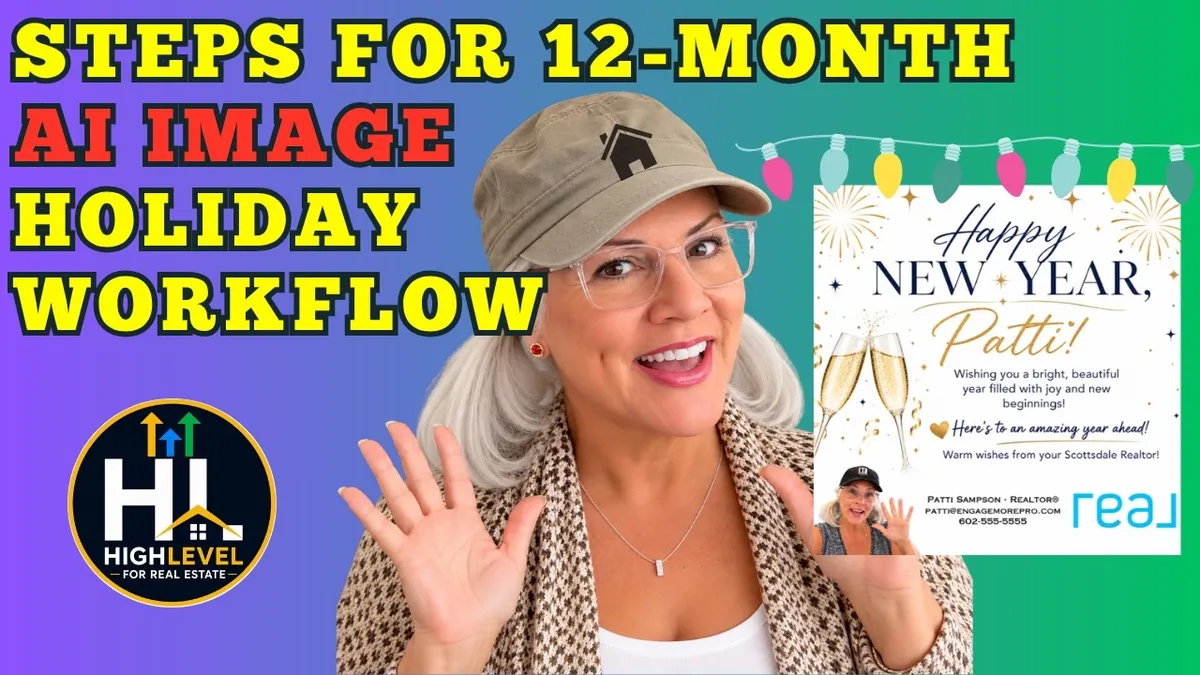
How to Build a Year Long AI Image Holiday Workflow Using HighLevel for Realtors
Holiday emails are a simple way to stay in touch with past clients and leads, but creating a new campaign for every holiday can take more time than most real estate agents have.

What if you could create personalized holiday images using AI, add your branding, and automate the emails for the entire year using HighLevel?
That is exactly what you can do.
With a little setup, you can create a holiday campaign that automatically generates custom images featuring each recipient’s name, sends a personalized email, and keeps your real estate business in front of the people who already know you.
The best part? Once you build the workflow, you can reuse the same structure year after year with a few simple updates.
Here is how to get started.
1. Create a Branded Template for Your AI Holiday Images
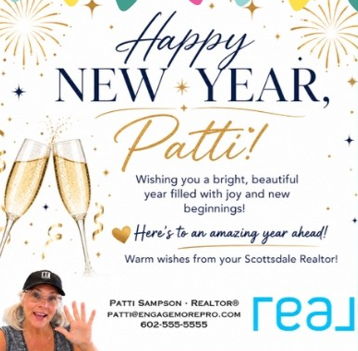
Before you start building your workflow, create a template that keeps your holiday images consistent with your real estate brand.
You want the images to feel personal, but you also want people to recognize who sent them.
Canva is an easy place to start. Create a square design, such as a 500 by 500 pixel image, and add your logo, brokerage information, contact details, and any other branding you want to include.
Once your design is ready, download it so you can upload it into HighLevel.
The idea is to give AI a branded starting point instead of asking it to create every part of the image from scratch.
When setting up your AI image generation action in HighLevel, upload your template and write a prompt that tells the system how to create the holiday image.
Your prompt should explain:
Which holiday the image is celebrating.
What kind of design or atmosphere you want.
How the recipient’s first name should appear.
Where your branding should remain visible.
What parts of the original template should stay unchanged.
For example, your New Year’s prompt might ask for a festive, professional image that wishes the recipient a happy New Year, includes their first name, and preserves your brokerage branding at the bottom.
You can then reuse the same branded template for Valentine's Day, St. Patrick's Day, Memorial Day, Independence Day, Labor Day, Halloween, Thanksgiving, and Christmas.
One thing to keep in mind is that AI generated images can vary. Test your prompt carefully to make sure the names are spelled correctly and your branding remains readable.
2. Build Your AI Holiday Workflow in HighLevel
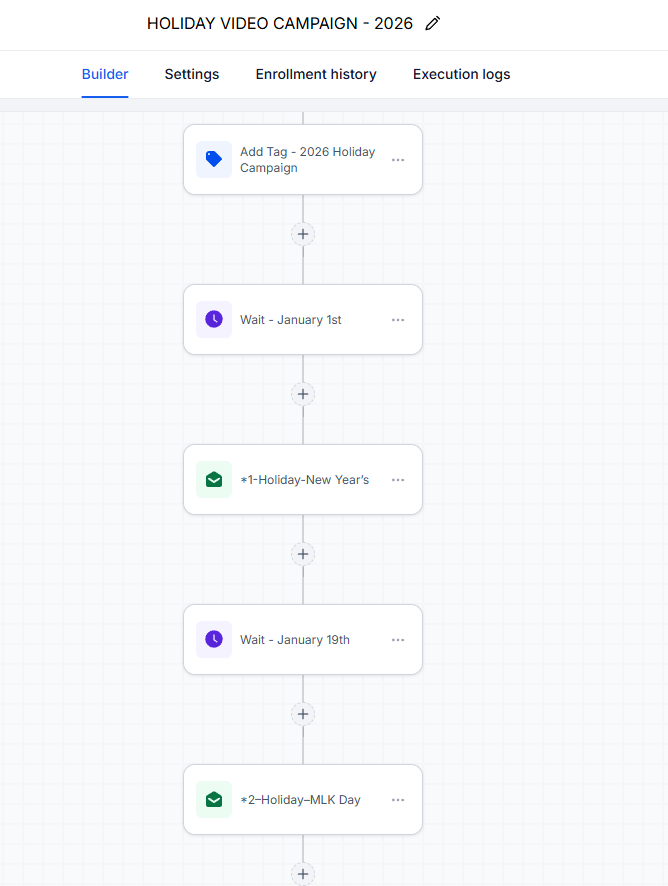
Once your template is ready, head into your HighLevel subaccount and open Automations.
Create a new workflow and give it a clear name, such as AI Holiday Image Workflow 2027.
You do not need a trigger while you are initially testing the workflow. You can manually add a test contact to the automation to see how everything works before scheduling the campaign.
The workflow will follow a simple pattern for each holiday:
Generate the holiday image using AI.
Create and send the personalized email.
Wait until the next holiday.
Generate the next image and send the next email.
Start by adding the AI Image Generation action. Enter your prompt, specify the first holiday, and upload your branded template.
Next, add a Send Email action.
Give the email a recognizable name, such as New Year's Email, so you can easily identify it when you return to the workflow later.
Set up your sender name and email address, and create a subject line that includes the recipient's first name.
For example, your subject line could read:
Happy New Year, {{contact.first_name}}!
Use the appropriate contact first name merge field available in your HighLevel account rather than typing the placeholder manually.
Inside the email, keep the message simple. A friendly greeting, a personalized holiday image, and your contact information may be enough.
You can also add a short message or a helpful tip to make each email more valuable.
Make Sure the AI Image Appears Inside the Email
This is one of the most important details in the setup.
The AI Image Generation action produces an image URL. If you simply paste that URL into the body of your email, the recipient may see a link instead of the actual image.
To display the image directly inside the email, copy the image URL custom value from the AI Image Generation action and use it as the source for an image element in your email builder.
Make sure the image reference matches the correct AI image action.
For example, the first AI image action should connect to the image element in the New Year's email. When you duplicate the actions for Valentine's Day, update the reference to the second AI image action.
Repeat this process for every holiday.
It may seem like a small detail, but getting those references right is what allows the correct personalized image to appear in each email.
Keep Your Email Signature Easy to Update
If you use an email signature with your contact details, pull it from your HighLevel profile settings instead of typing the entire signature into every email.
Why?
If you change brokerages, phone numbers, or other contact information, you do not want to update dozens of individual templates.
Using a reusable signature field makes future changes much easier.
3. Duplicate Your Actions to Create the Entire Year
Once your first holiday email works, you do not have to build every other holiday from scratch.
Duplicate the AI Image Generation and Send Email actions, then update the details for the next holiday.
For Valentine's Day, change the image prompt to reflect Valentine's Day, update the email subject and greeting, and change the image reference to match the new AI image action.
Then repeat the process for St. Patrick's Day and the remaining holidays.
Keep the following details consistent as you duplicate your actions:
The holiday name in the AI prompt.
The email subject line and greeting.
The AI image reference inside the email.
The internal action names so you can identify each holiday.
The date and time when the email should be sent.
You can also vary the wording and image prompts so your campaigns do not look identical every year.
For example, your New Year's image could have a fresh, celebratory design one year and a more elegant, professional look the next.
You do not have to create an entirely new workflow each time. Reusing the structure saves time while allowing you to refresh the content.
Choose Holidays That Make Sense for Your Audience
You can start with widely recognized holidays, but your campaign should reflect your location and the people you serve.
Some agents may want to include Hanukkah or other cultural celebrations. Mother's Day and Father's Day can also be useful, but those messages should be sent to appropriate contacts rather than your entire database.
You can create separate workflows for holidays that apply only to certain groups.
For example, a Mother's Day campaign could target contacts for whom the message is relevant. A home purchase anniversary campaign could be designed specifically for past clients.
Personalization is not just about adding someone's first name. It is also about sending the right message to the right person.
4. Schedule Each Email for the Correct Holiday
After you have created your holiday actions, it is time to set the timing.
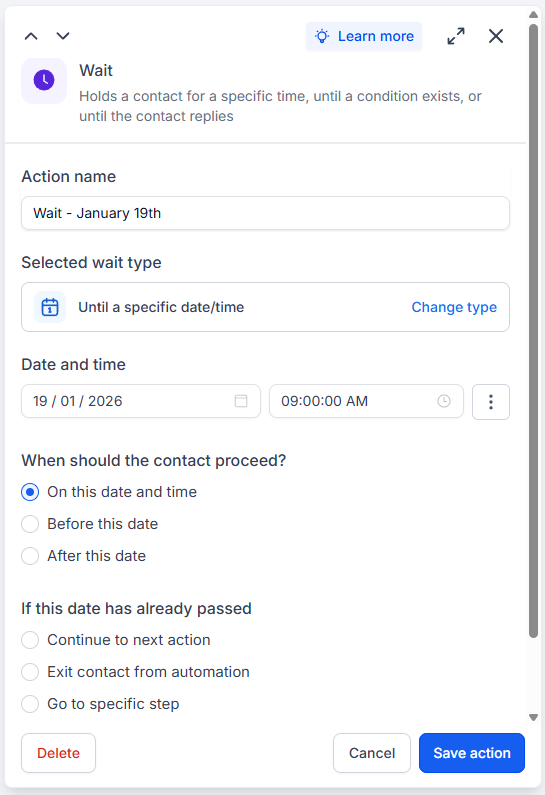
During the initial setup, you can use short delays between actions to test whether the images generate and the emails send correctly.
However, those short delays are only for testing. You will need to replace them with the appropriate dates before using the workflow with real contacts.
In HighLevel, add a Wait action before each holiday's image generation step and configure it to wait until the intended date and time.
For example, you might schedule:
New Year's Day for January 1.
Valentine's Day for February 14.
St. Patrick's Day for March 17.
Memorial Day for its correct date that year.
Independence Day for July 4.
Labor Day for its correct date that year.
Halloween for October 31.
Thanksgiving for its correct date that year.
Christmas for December 25.
Some holidays fall on the same date every year. Others, including Memorial Day, Labor Day, and Thanksgiving in the United States, change dates from year to year.
That means you need to review those dates whenever you prepare the workflow for a new year.
Also, decide whether you want your messages to arrive on the holiday itself or a little earlier. For major holidays such as Christmas, sending a greeting ahead of time may be more appropriate.
Check the workflow's settings for what should happen if a contact reaches a Wait action after its scheduled date has already passed. Configure the behavior so contacts do not receive an unintended late holiday email.
Before publishing the workflow, review the sequence from beginning to end. Confirm that each wait action leads to the correct image generation action and the matching email.
5. Test the Workflow Before Sending It to Your Database
Do not assume everything is working just because the workflow looks correct on your screen.
Test it first.
Add yourself or a designated test contact to the workflow and use short delays between the first few holiday actions. This lets you check whether the images generate correctly and the emails contain the right information.
Review each email for:
Correct recipient name.
Appropriate holiday greeting.
Correct AI generated image.
Clear and readable branding.
Accurate contact information.
A working email signature, if included.
Proper formatting on desktop and mobile.
Pay attention to where the emails arrive, too.
A message appearing in your promotions or spam folder does not automatically mean the workflow failed. Email placement can depend on your sending domain, authentication, sender reputation, recipient settings, and message content.
If an email does not appear in your inbox, check more than just your inbox. Review your spam and promotions folders, then inspect the contact's activity and the workflow execution logs in HighLevel.
The execution logs can help you determine whether an action ran successfully. If the workflow shows that an email was sent but you cannot find it, investigate the delivery details rather than assuming the automation is broken.
Also, test with an address separate from the email account used to send the messages. This gives you a more realistic view of how your campaign is received.
Once your tests look good, replace the temporary delays with the proper holiday schedules and review the entire workflow again before activating it for your contacts.
Make Your Holiday Campaign a Relationship Building Tool
A holiday email should feel like a thoughtful touchpoint, not another advertisement.
You do not need to pitch your services in every message. A personalized image and a warm greeting can help keep your name familiar to people who may not need a real estate agent today but could need one in the future.
If you want to make the campaign more useful, add a short piece of content to some of the emails. You could share a seasonal home maintenance tip, a local community update, or a simple reminder related to homeownership.
You can also make your branded image clickable. For example, you could link it to a page where recipients can search homes in your market.
That gives interested contacts a natural next step without making every holiday email feel like a sales pitch.
And remember, a holiday campaign does not have to rely entirely on email. You might decide to send a couple of well timed text messages throughout the year, too, rather than texting people for every holiday.
Other useful campaigns include birthday greetings and home purchase anniversary messages. For past clients, a personalized message celebrating the anniversary of their home purchase can be a thoughtful way to reconnect.
The key is to make your communication feel personal and relevant.
Start Small, Test It, and Build From There
You do not have to create twelve months of content in one sitting.
Start with two or three holidays. Build your branded template, set up the AI image generation action, connect it to the email, and test the workflow.
Once you understand how the actions fit together, duplicating them for the remaining holidays becomes much easier.
Review your dates every year, refresh your prompts when needed, and keep your contact information up to date. A little maintenance will help you keep the campaign useful and relevant.
If you want help setting up HighLevel for your real estate business, visit EngageMore Pro. You can also join the HighLevel for Real Estate community to get support and access the AI image prompt discussed in this workflow.
The goal is simple: stay in touch with your people without creating more work for yourself every holiday. With a well tested workflow, you can spend less time building individual campaigns and more time building relationships.
How to Build a Year-Long AI Image Holiday Workflow using HighLevel for Realtors



About Us
Brand your success with personalized promotional merchandise that captivates your audience.
Contact Us
2942 N. 24th St., #115 - PMB 7114, Phoenix AZ 85016-7849
Phone: (602) 818-1667
Email: [email protected]
Copyright© 2026 *EngageMorePRO | ExposedAgent - All Rights Reserved.
Facebook
Instagram
Youtube